DeepSeek Harness tested: everything is a plugin, and that is not marketing
What this piece is and is not. I have been running DSH since 14 August as a permanent web service on my own machine, connected to my own model router instead of straight to DeepSeek. I measured all the figures below myself on 21 August 2026; I reproduced and fixed the two bugs myself. What I did not test is stated as well. This is an open-source repo, so there is no affiliate link in this article — only a link to the source code.
What DSH is
DeepSeek Harness — command dsh — is the agent framework that DeepSeek
released itself under an MIT license. It is not a model and not a chat window, but the
layer in between: session management, tools, memory, subagents, plan mode, skills, a web interface
and a headless mode. Compare it to Claude Code or OpenAI Codex, but as a construction kit
in which every part is replaceable.
The motto on the repo is Everything is a Plugin. That sounds like a slogan, and that was my first reaction too. It turned out to be literally true, and that is the most interesting thing about this project.
The figures first, because they tell two stories
| Measurement (21 August 2026) | Value |
|---|---|
| Stars on GitHub | 167.000 |
| Forks | 17.700 |
| Watchers | 704 |
| First npm publication | 13 August 2026 |
| Number of releases since then | 8 |
| Latest version | 0.1.0-rc.7 (next: 0.1.0-rc.8) |
| Downloads 10–19 August | 648.038 |
| Peak day (17 August) | 130.993 |
| License | MIT |
The first story is adoption: well over six hundred thousand downloads in seven active days is not a bubble, those are people who really install it. The second story is age. This project is eleven days old. Eight releases in nine days, and the repo calls itself a developer preview in plain terms, with breakage to be expected.
So those 167,000 stars say almost nothing about maturity. They say something about the name DeepSeek. The ratio is telling, by the way: 167,000 stars against 704 watchers. Stars are an applause meter, watchers are people who actually want to follow the commits. For a project you put into production, that second number is the more honest one.
Installing takes one command
npx @deepseek-ai/dsh web
# webinterface op http://127.0.0.1:3080
That is all there is to it. You need Node (I run 22.23) and pnpm for your own plugins.
What struck me as positive while measuring: the server listens only on 127.0.0.1,
not on all interfaces. For a tool that is allowed to run shell commands that is the right
default — if you do want to reach it from another machine, do that with a
tunnel and not by opening up the binding, as described in
local LLM servers safely in your
network: the same trade-off applies here, with the difference that DSH does not only answer but
also touches your file system.
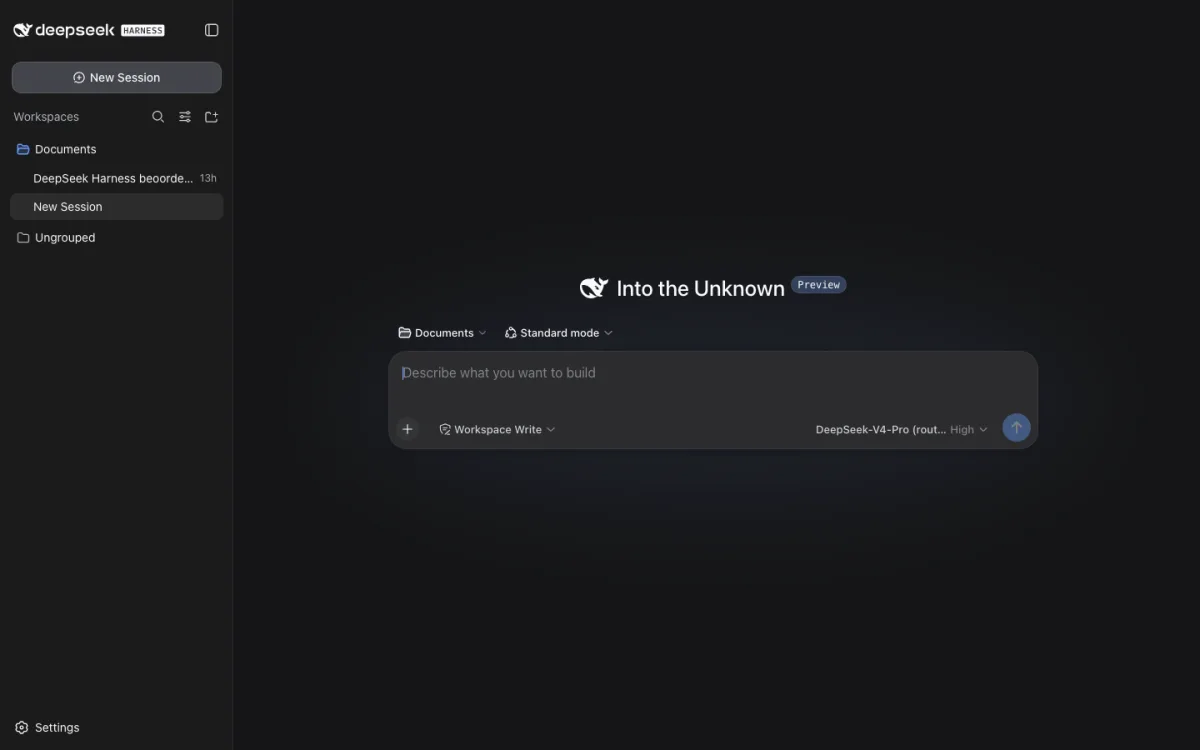
The interface is calm and does little that surprises: workspaces on the left, sessions below them, at the bottom a choice of mode (standard, plan) and write permissions (Workspace Write). Anyone who knows Claude Code or Cursor is at home within a minute. There is no desktop app; the web interface is the app.
Everything is a plugin — here is the proof
I had the composed configuration of my web profile printed out. That produces a list of 129 plugins that together form what you see on your screen. Not 129 optional extras: the session itself, the agent itself, the title generator, every tool, the telemetry layer — all of them plugins in the same list.
$ dsh --profile web --dump-config
# == @deepseek-ai/dsh-base
- id: llm
  name: '@deepseek-ai/dsh-llm'
- id: session
  name: '@deepseek-ai/dsh-session'
- id: agent
  name: '@deepseek-ai/dsh-agent'
# == @deepseek-ai/dsh-base, patched by $DSH_HOME/profiles/web/cordis.patch.yml
...
Note the comment lines. Every plugin states which bundle it comes from and which layer modified it afterward. That is a small detail with large consequences: if you see behavior you did not expect, the configuration itself points out what caused it. I have seen few frameworks that do that so neatly.
The structure is a stack of patch layers. A profile is a directory with a package.json
(which bundles, in which order) and a cordis.patch.yml (your own adjustments).
These are laid over each other: first the bundles in order, then your profile patch, then the
patch at home level, then whatever you pass in through --patch . With
--dump-default-config you see the state without your layers, with --dump-config
the state with them. Looking for the difference between those two is your debugging method right there.
In practice this is what it means. I did not want DSH to talk to DeepSeek directly, but through my own router, so that consumption lands in my cost accounting and there is automatically a fallback chain behind it. That took eleven lines of YAML in a single patch file:
- id: llm-deepseek
  config:
    baseURL: http://router.intern:8093/v1
    models:
      - id: deepseek/deepseek-v4-pro
        name: DeepSeek-V4-Pro (router)
- id: agent-default-model
  config:
    provider: deepseek-official
    model: deepseek/deepseek-v4-pro
No fork, no patched node_modules, no juggling with environment variables. Why you would want that — and what a router layer delivers in cost and fallback — I worked out earlier in outsourcing AI tasks smartly through a proxy and routing; this article is about the harness itself, that article about the layer underneath.
Presets and skills
DSH ships with four agent presets: minimal, standard,
code and cordis. Every preset is a directory with a
agent.cordis.yml and optionally a skills/directory with
SKILL.mdfiles. That is the same convention as with Claude, and that is good
news: instruction files you have built up there move over without any translation step. What an
instruction file should and should not contain is in
CLAUDE.md that does work — the four patterns in it
apply here one to one.
Besides the web interface there is a headless mode, and for automation that is the most interesting one:
dsh --profile headless "draai de tests en vat de fouten samen"One fresh session, one answer on stdout, a nonzero exit code on errors. That is exactly what you need to hang an agent in a cron job or a CI step without keeping a browser open.
Telemetry: the way it should be
This deserves its own heading, because I rarely see it arranged this well. The telemetry layer
is set to DISABLED by default and only turns on if you set
DSH_TELEMETRY_MODE yourself. In the disabled state the export pipeline is not
even built. There is no silent default, no opt-out after installation.
More important still: the documentation has a section called What leaves the machine that lists without embellishment what does leave once you turn it on — message content, tool arguments and results (so command output and file contents), the full system prompt, todo texts, and your working directory as a local path. There are no redaction rules in it; you have to add those yourself. API keys are structurally not included, because they are not session events.
Practical consequence. Leave DSH_TELEMETRY_MODE alone unless you
have your own OTLP collector running. If you set it to FULL without your own
redaction rules, you send the contents of the files the agent reads to the outside world. The
makers say so honestly; the responsibility after that is yours.
Where it went wrong: two bugs from practice
1. Every tool call failed with unknown tool ""
This is the most annoying one, and it hits exactly the people who want to use DSH for something
serious. As soon as I addressed the model through my own OpenAI-compatible endpoint, the
agent refused every tool call. Not now and then: always. Through
api.deepseek.com the same model worked without any trouble.
The cause is in the accumulator that glues streaming tool calls together. With
streaming, a provider sends the name of the tool once, in the first chunk, and
after that null while the arguments trickle in. That is allowed and happens
often. The check in DSH, however, only looked at undefined:
- if (call.function?.name !== void 0) block.name = call.function.name;
+ if (call.function?.name != null)  block.name = call.function.name;
Because null !== undefined is true, the already known name was overwritten at every following
chunk with null, and on completion it fell back to an empty string.
So the agent neatly called a tool that did not exist. One character of difference —
!= instead of !== — and tool use worked again, verified
end to end.
That this got through the tests says something about the coverage: apparently the testing is done against the in-house API and not against the variety of the OpenAI protocol. If you want to check for yourself whether tool calls land reliably in your setup, you will find the measurement method in testing function calling accuracy with complex schemas; I should have run that test earlier than I did.
2. Certificate errors that only hit the agent
The second was subtler. The web tools of the agent got
CERTIFICATE_VERIFY_FAILED on GitHub, Reddit and Hacker News, while
curl from the same machine simply worked. The cause: every little tool grabbed the
certificate bundle of whichever interpreter happened to come first in PATH , and
under launchd that is a different one than in your own terminal.
The solution was not in DSH but around it — one fresh bundle for everything, set in the startup script:
CERTIFI_PEM=$(python3 -c "import certifi;print(certifi.where())")
export SSL_CERT_FILE="$CERTIFI_PEM"
export REQUESTS_CA_BUNDLE="$CERTIFI_PEM"
export NODE_EXTRA_CA_CERTS="$CERTIFI_PEM"
This is not a DSH bug in the strict sense, but it is the kind of thing a framework ought
to catch: if you run tools in an environment you build yourself, you should also set the
TLS roots explicitly instead of hoping that PATH cooperates. Count
on plugging this kind of gap yourself with a service under launchd or systemd.
The critical note
The documentation is written for contributors, not for users. The
README of the CLI package refers to src/args.ts and
src/bin.ts — files that do not exist in your installation. The explanation is
technically excellent and sometimes even beautifully precise, but it assumes you have the monorepo
in front of you. For a project with six hundred thousand downloads that is a gap.
The pace is too high to run unpinned. Eight releases in nine days,
and the version number is still at 0.1.0-rc. I run rc.6 myself while rc.7 is already
called stable and rc.8 is standing by as next . Pin an exact version in your installation
and only update when you have time to test, because here the developer preview label really means
that interfaces are allowed to break.
There is no ecosystem, only an architecture. The plugin model is the promise of this project, but at the moment almost all 129 plugins come from DeepSeek itself. Whether everything is a plugin becomes more than an internal ordering principle depends on whether third parties publish plugins for it six months from now. That cannot be seen yet.
What I did not test. I have only touched the subagents, the workflow worker and the plan mode superficially, and I have not put DSH next to Claude Code or Codex in a fair comparison on the same task. The latter is worth a separate measurement; judging a framework on a handful of sessions is exactly the mistake I point out in reviews by other people.
Who this is for
Yes: you are building agent infrastructure yourself, you want to be able to see and change what happens in the layer between model and tool, and you like the fact that a router switch costs eleven lines of YAML instead of a fork. Also: you want to hang an agent headless in a cron job without being tied to a subscription.
No: you want to deliver production work today and have no appetite for tracking down bugs yourself in an eleven-day-old codebase. In that case take something that has stood in the wind for a year, and come back in three months.
Verdict
DeepSeek Harness is the best thought-out agent framework I have opened up this year, and at the same time the youngest. The architecture is not a slogan: 129 plugins in one list, showing per plugin which layer modified it, and a telemetry layer that is off by default and honestly writes down what it would send. Those are choices made by people who know what they are doing.
Against that stands the fact that in one week I ran into two blocking problems, one of which made all tool use impossible as soon as you are not talking to DeepSeek directly. That is not a disaster for a developer preview — it is exactly what the label promises. It is the reason to follow this project now and not to trust.
Repo:
github.com/deepseek-ai/deepseek-harness
· MIT license · TypeScript
Install: npx @deepseek-ai/dsh web · requires Node
(tested with 22.23), pnpm for your own plugins
Tested: 0.1.0-rc.6 on macOS (Apple Silicon), 14–21 August 2026
Cost: the harness is free; you only pay for the model you put
underneath it